Two config directories, and I would have edited the wrong one
The settings I wrote down two hours ago would have gone into a file nothing reads.
I sat down to add the editor settings I’d written up in JRN 26-008 and found
~/.config/zed/ sitting there — existing, correctly named, and completely
empty.
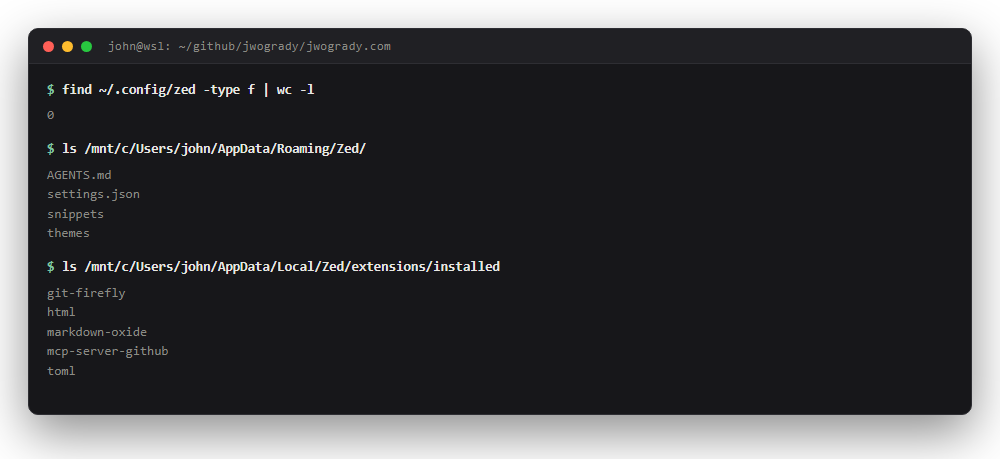
Zero files. Meanwhile AppData/Roaming/Zed/ has the settings.json I’ve
apparently been editing all along, and AppData/Local/Zed/extensions/installed
has five extensions I don’t remember installing individually.
Of course it does. Zed runs on Windows and edits over WSL. What’s in here
is zed-remote-server, a headless process that hands files back and forth. It
isn’t the editor. It has no settings because it isn’t the thing being
configured.
So ~/.config/zed/ is a decoy — a real directory, created by something, read
by nothing. I’d have written four carefully-reasoned settings into it and
spent a while wondering why none of them took effect.
That’s the second time today the same shape of mistake nearly got me. In JRN 26-005 the editor and the disk held two different documents. Here there are two config directories and only one is live. Both times the thing I was looking at was plausible, adjacent to the real thing, and wrong.
I don’t have a general rule for this yet. The closest I’ve got: when a config change appears to do nothing, stop tuning the setting and go prove the file is being read.
What went in
"autosave": "on_focus_change",
"languages": {
  "Markdown": {
    "soft_wrap": "editor_width",
    "remove_trailing_whitespace_on_save": false
  }
}
The middle one matters more than it looks. Two trailing spaces is a hard line break in Markdown, so stripping them on save silently rewrites prose — and because whitespace is invisible, the diff looks clean.
Extensions are declared rather than clicked, so a new machine installs them on first launch instead of being configured from memory:
"auto_install_extensions": {
  "toml": true, "html": true, "html-jinja": true,
  "markdown-oxide": true, "git-firefly": true
}
toml is doing real work — every entry on this site opens with a TOML front
matter block, and without it that’s forty lines of unhighlighted text at the
top of every file.
html-jinja is a compromise I want to record honestly. There is no Hugo
extension and no Go-template extension in the Zed registry. I searched for
hugo, gotemplate, go-template and templ, and the nearest thing is a
Jinja highlighter that happens to share Hugo’s {{ }} delimiters. It’ll
colour the braces and it won’t understand a single Hugo function. That’s
better than nothing and I’d like to be wrong about it.
Snippets, finally — jrn for a full front matter block, fig, spot, res.
I asked for these on day one and then spent the afternoon hand-typing the
thing I’d asked for.