Two config directories, and I would have edited the wrong one
Zed runs on Windows and edits over WSL, so the config that matters is not the one in the Linux home directory.
Two config directories
-
I sat down to add the editor settings I’d written up in JRN 26-008 and found
~/.config/zed/sitting there — existing, correctly named, and completely empty.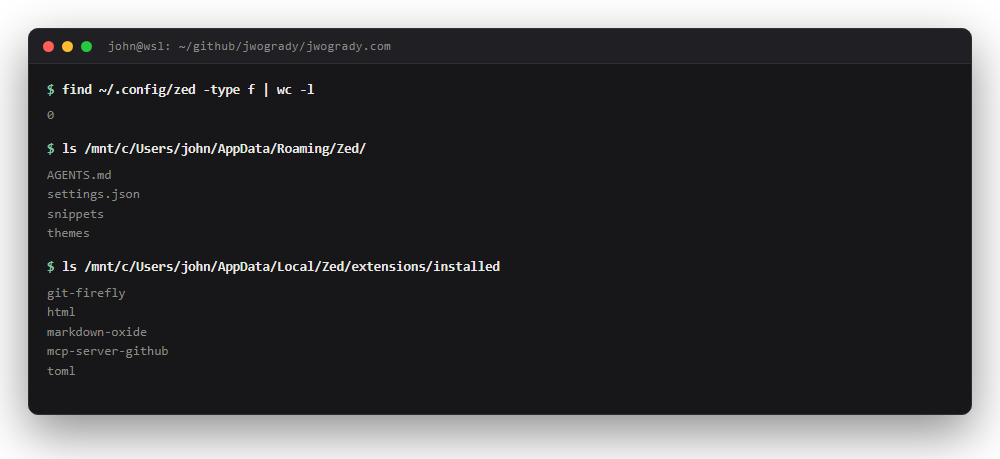
Zero files on the Linux side. Everything on the Windows side.Screenshot -
Zero files.
-
Meanwhile
AppData/Roaming/Zed/has thesettings.jsonI’ve apparently been editing all along, andAppData/Local/Zed/extensions/installedhas five extensions I don’t remember installing individually.
Zed runs on Windows and edits over WSL.
- What’s in
~/.config/zed/iszed-remote-server, a headless process that hands files back and forth. - It isn’t the editor. It has no settings because it isn’t the thing being configured.
- So
~/.config/zed/is a decoy — a real directory, created by something, read by nothing. - I’d have written four carefully-reasoned settings into it and spent a while wondering why none of them took effect.
- That’s the second time today the same shape of mistake nearly got me.
- In JRN 26-005 the editor and the disk held two different documents.
- Here there are two config directories and only one is live.
- Both times the thing I was looking at was plausible, adjacent to the real thing, and wrong.
- I don’t have a general rule for this yet. The closest I’ve got: when a config change appears to do nothing, stop tuning the setting and go prove the file is being read.
What went in
-
The settings themselves:
"autosave": "on_focus_change", "languages": { "Markdown": { "soft_wrap": "editor_width", "remove_trailing_whitespace_on_save": false } } -
The middle one matters more than it looks.
-
Two trailing spaces is a hard line break in Markdown, so stripping them on save silently rewrites prose — and because whitespace is invisible, the diff looks clean.
Extensions
-
Extensions are declared rather than clicked, so a new machine installs them on first launch instead of being configured from memory:
"auto_install_extensions": { "toml": true, "html": true, "html-jinja": true, "markdown-oxide": true, "git-firefly": true } -
tomlis doing real work — every entry on this site opens with a TOML front matter block, and without it that’s forty lines of unhighlighted text at the top of every file. -
html-jinjais a compromise I want to record honestly.
There is no Hugo extension and no Go-template extension in the Zed registry.
- I searched for
hugo,gotemplate,go-templateandtempl, and the nearest thing is a Jinja highlighter that happens to share Hugo’s{{ }}delimiters. - It’ll colour the braces and it won’t understand a single Hugo function.
- That’s better than nothing and I’d like to be wrong about it.
- Snippets, finally —
jrnfor a full front matter block,fig,spot,res. - I asked for these on day one and then spent the afternoon hand-typing the thing I’d asked for.